Forms are a valuable tool for collecting leads, engaging with current customers, and facilitating seamless communication with your business. However, they can also be targeted by spammers and bots, resulting in an influx of unwanted submissions that interfere with valuable business inquiries. Various solutions are available to minimize spam and maintain the integrity of your form submissions, including the honeypot feature in WordPress website’s Gravity Forms.
What is a honeypot?
A honeypot is a hidden form field that is not visible to users but is visible to bots. If this honeypot field is filled out when a form is submitted, then the form submission is most likely from a bot and can be considered spam.
How do I enable the honeypot feature on my Gravity Form?
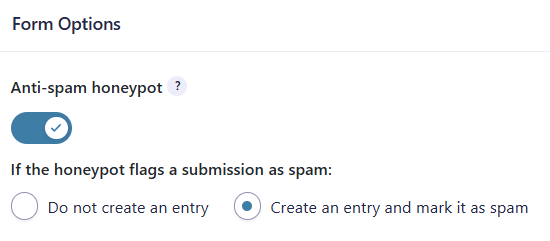
- The honeypot feature can be enabled on each Gravity Form under Form Settings -> Form Options by using the ‘Anti-spam honeypot’ field, which can be toggled on or off.
- Once the ‘Anti-spam honeypot‘ feature has been enabled, there are two options to handle form submissions that are flagged as spam.
- Do not create an entry – The form submission will not be saved, no form notifications will be sent, and any additional integrations (e.g., Constant Contact or MailChimp) will not be processed. The default form confirmation message, ‘Thanks for contacting us! We will get in touch with you shortly,’ will be displayed instead of any custom form confirmation that has been set up.
- Create an entry and mark it as spam – The form submission will be saved but will be marked as spam, and no notifications or additional integrations (i.e., Constant Contact or MailChimp) will be processed. The default form confirmation message of ‘Thanks for contacting us! We will get in touch with you shortly.” will be displayed instead of any custom form confirmation that has been set up
Where can I view my form submissions that have been flagged as spam?
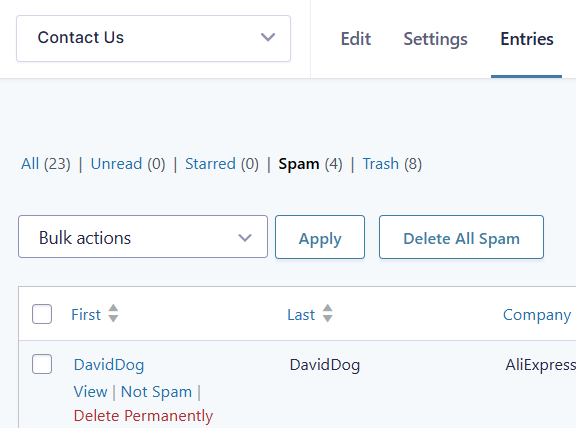
- Form submissions marked as spam can be viewed under Entries for a specific form. A ‘Spam‘ link is listed with the number of marked spam entries.
- When reviewing the form entries that have been marked as spam, it is possible to change them to ‘Not Spam’. This will allow the entry to be moved to the list of ‘All’ entries. It does not send out any notifications that are set up for the form, and this would need to be done manually.
- It is recommended that you review the form submissions on your site regularly (daily or weekly, depending on traffic to your site) to ensure that valid submissions are not missed.
Spammers and bots can disrupt the management of your forms, but the honeypot feature in Gravity Forms helps streamline the process and reduce unwanted submissions so you can focus your efforts on the quality submissions that you receive.
Need Help Managing Form Spam?
Your team at Vivid Image is ready to assist with any form updates you need to help mitigate spam. Contact your Account Director or get in touch using our online form.
