 When in doubt, don’t click the link
Whether the link is on an official looking website or in an email that looks like it came from the right people, always make sure you trust the source of any link you click on. When in doubt, do a Google search for the company in question and go through their website to find what you’re looking for, rather than following a link.
Beware of piggy back attacks
If you download a copy of popular free software like Skype or Dropbox for example, make sure you’re getting it from the software creator’s official website. Software downloaded from 3rd party sites can often be bundled with lots of additional spyware/malware.
Avoid the curse of the toolbar
Toolbars seem like a great idea at first. Who doesn’t want to save money or speed up their Internet? These features often come at a price though. Toolbars often monitor and report on all your web browsing habits and could even compromise your security by tracking the keys you type thus revealing usernames and passwords for any website you may visit.
Written by a 3rd grader
Often automated emails and even entire websites designed to trick users into downloading malicious software are built entirely by automated programs nowadays. The upside is these “bots” often fail when it comes to simple things like spelling and grammar, giving the astute observer an easy way to sniff out a fake. Sometimes these grammatical errors and typos are even created intentionally to weed out the “smart” users, so the scammers don’t end up wasting their time.
 Antivirus, Firewalls, & Passwords Oh My!
Passive Attacks
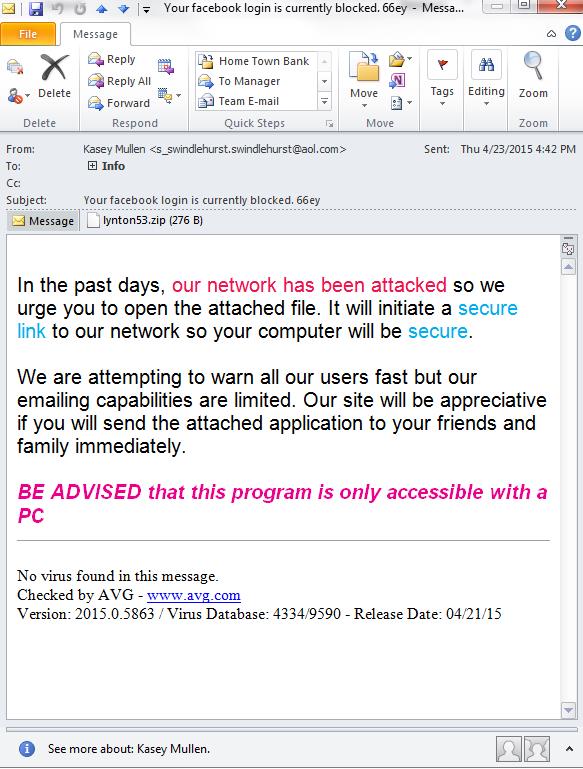
Most attacks are passive attacks. Someone sends a phishing email (an email that looks like it came from a legitimate source, but often links to a fake website designed to steal login usernames and passwords) or creates a fake website to lure people in. These types of attacks rely on a user clicking a link and downloading and installing bad software or voluntarily tying in login credentials into a fake website. Take a look at the email at the right, which is an actual phishing email designed to scare someone into clicking and sharing the email.
Active Attacks
Active attacks on the other hand require no involvement from you the user. An active attack could be someone trying to gain access to your computer remotely or it may involve them trying to crack your bank login password. In these instances, planning ahead is the only real way to protect yourself. First use a strong password with a minimum of 8-12 characters using number, uppercase, lowercase and special characters. Ensure your operating system is up to date. Make sure your OS firewall is on and working. If you have a wireless router like most people, make sure the software on it is also up-to-date. Never use unsecured wireless connections to do something that requires using a username, password, or credit card transaction; examples of this might be the airport, mall, or Internet cafe (all typical places accounts get compromised, hacked, or acquire viruses). Next, get a reputable anti-virus program, keep it on, and keep it up-to-date.
Damage done. Time to hit the reset button
Sometimes even the best defense in the world falls a little short. What do you do once you are compromised? The first step is to alert your financial institutions, such as banks and credit card companies that you believe your username/passwords may have been compromised. Do this in person or over the phone. This will put them on alert to watch out for suspicious activity on your accounts. Next, change your passwords and get your computer/phone/mobile device system(s) clean. If you think you can do it yourself go for it, but in most cases we recommend contacting a professional service. Was data lost or damaged? Restore it from your backup…you are doing backups right?
Backups! They’re not just for the big guys
Imagine you walk into your office and turn on your computer, when suddenly your PC catches fire! Or worse yet, imagine walking up to your office building only to see it engulfed in flames! Stop and think for a second about what you just lost. Financial records, client data, emails, that family Christmas newsletter you’ve been working on for 6 months…Most of these things are stored in the cloud nowadays and can easily be pulled back down, but not everything is automatically getting saved there. Do yourself a huge favor and take the time to evaluate which parts of your data are getting backed up and which parts aren’t, then put in place a backup system that includes redundancy and off-site backups. Not sure what this means, give us a call and we’ll point you in the right direction.
For more information on malware protection, visit “Cyber Security for Small Businesses” by the FCC.

