Google Analytics 4 (GA4) has officially replaced Universal Analytics (UA), which stopped processing data on July 1, 2023. While every website has been relying solely on GA4 for new data for quite a while now, many users are still adjusting to the new interface and features. If you’re trying to understand how GA4 differs from the older UA platform or you’re still making sense of historical data, this post will help clarify what changed and why it matters.
How Do I Upgrade to GA4?
If you were a client of ours with the Safe and Sound Hosting plan during the transition period, we’d already automatically taken care of this for you or reached out if there were any roadblocks.
If you weren’t on our Safe and Sound Hosting plan and didn’t manually upgrade yourself, Google likely created a new GA4 property for you. However, you’ll still need to go through your configuration settings to make sure things are setup the way you need them to be, and ensure you implement the tracking code on your website.
What About My Historical Data?
Data that was collected with Universal Analytics was not able to be imported or retained within GA4. This is because these two versions are based on different data collection models. UA data was only retained for 6 more months after the date that Google officially stopped processing data on July 1, 2023. Any historical data from UA is no longer available, unless you manually exported that data into a PDF of spreadsheet before it was deprecated.
What’s Different About GA4?
There are quite a few differences between the new GA4 & UA. Just a couple of the differences you may notice are a brand new interface & a new way of measuring and collecting data. Because data collection models are different, if you evaluate data from both versions while they were running these at the same, you’re going to see different results. In addition, not all the same metrics will be present. This is also why it was not possible to import historical data from UA into GA4 — they’re just not the same.
Universal Analytics (UA)
Home Dashboard Interface:
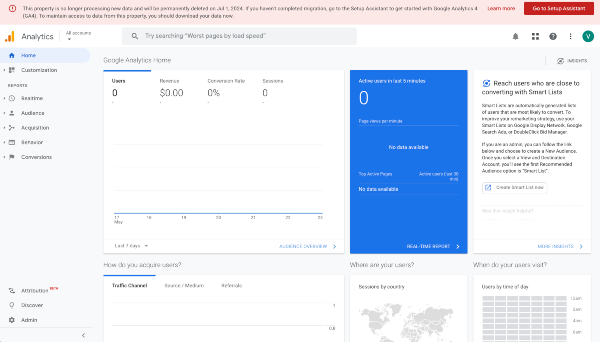
Data Collection Model:
Data collection for UA is Session-Based. This means interactions like pageviews & events are collected as different hit types within a session.
Google Analytics 4 (GA4)
Home Dashboard Interface:
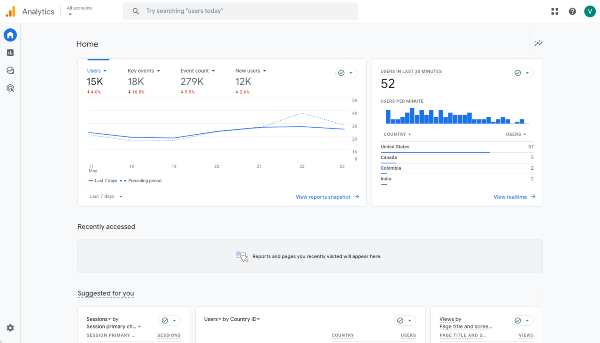
Data Collection Model:
Data collection for GA4 is Event-Based. This means that every single interaction is tracked as an event that gives better insight into user interactions.
If you’re planning on digging into your Analytics data yourself, we highly recommend jumping in to get familiar with how things work. Here’s a link to Google’s help article on the comparison of UA & GA4 metrics for more of the details.
GA4 Is Still Evolving
Keep in mind that GA4 is still frequently releasing updates & new features, so if you’re interested on keeping up with those you can typically find them on Google’s release notes page.
Not Finding the Data That You Need?
If you would like further instruction on how to find more in-depth reporting in the GA4 interface, feel free to reach out to your account director if you’re a client, or get in touch using our online form.
