ABOUT | BLOG | PODCASTS | EVENTS | SUPPORT

  • Skip to main content
  • Skip to footer

Vivid Image

  • Strategy
  • Web Design
    • Subscription Websites
    • WordPress Websites
    • Hosting
    • Portfolio
  • Digital Marketing
    • Online Listings
    • Reviews & Reputation
    • Google PPC
    • Local SEO
    • Social Media Ads
    • Social Media Management
    • Search Engine Optimization
    • Branding & Graphic Design
    • Content & StoryBranding
  • Marketing Department
  • Search
  • Talk with Our Team

How can we help?

Popular Searches

Website Design

Print Design

Contact Us

Search Ranking

Google Ads

Storybrand

Content Writing

Events

Training

Logo Design

Hiring

Our Team

Our Culture

Be Aware of the Surge of Fake Alerts on Facebook

Blog Social Media Be Aware of the Surge of Fake Alerts on Facebook
fake facebook alerts

Facebook Messenger

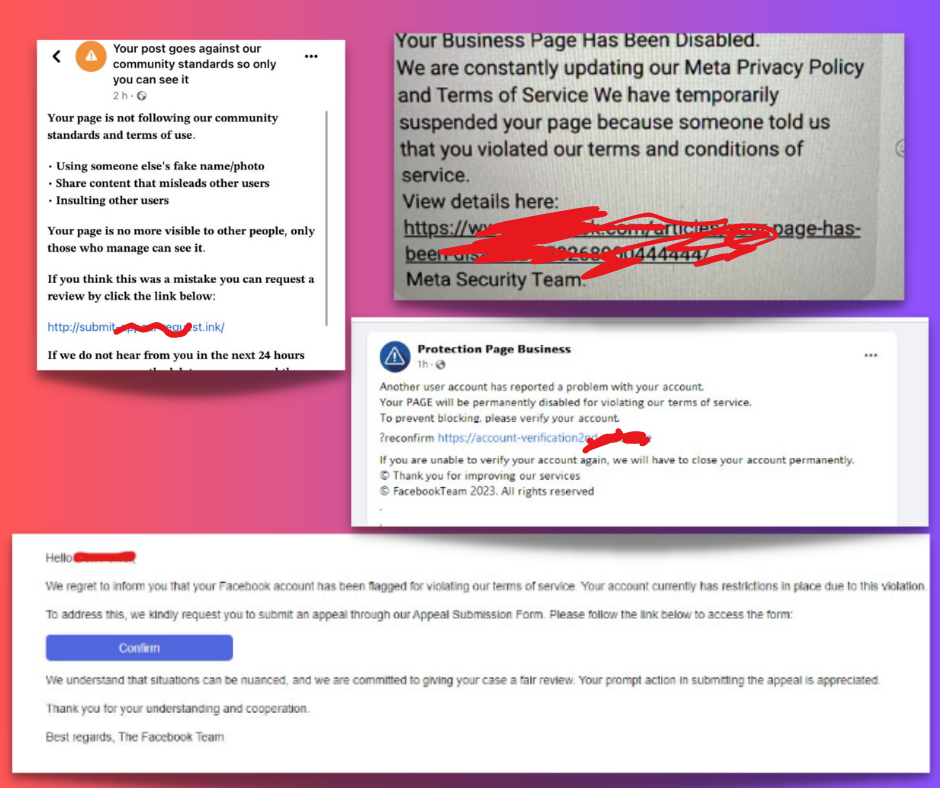
If you haven’t received one of these seemingly alarming messages via email, private message, or on-page tagging yet and you are an admin of a Facebook page, chances are you will. We are closely monitoring the influx of fraudulent copyright infringement notifications or community standard violations, and Facebook is working quickly to combat this surge.

It’s essential to be vigilant, as most of these alerts, which may appear as official communications from Facebook, are actually spam. For your safety, please refrain from clicking on any links in such messages. Don’t panic, but rather check on your page quality.
Emails

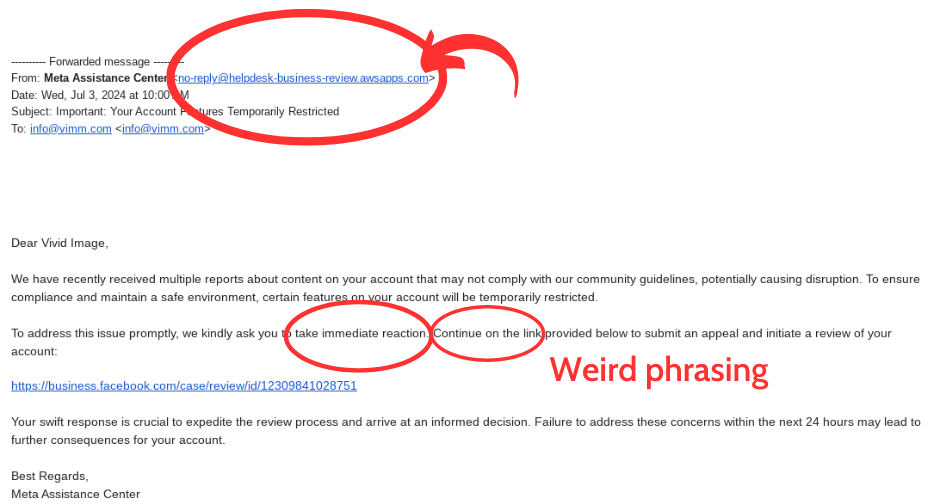
Spam emails are common too and can be very tricky. The best thing to do is look at the sender. In this example, you can clearly see it’s not from Facebook. It contains an overly “anxiety inducing,” hurried language to get you to click the link, and often weird phrasing or typos.

What Should You Do?

  1. Don’t click ANY links in such messages or emails. Instead, log in as normal, navigate to your page, and check your Page Quality. It should say “good” & “no violations”.
  2. Mark messages in private messenger as “spam” and delete them. Ignore or report emails as spam. Report as “spam” and “block” any pages or commentators that leave spammy messages tagging your page.
  3. Familiarize yourself with Facebook Community Standards so you don’t inadvertently post anything on your page that could cause a legitimate issue with your page getting disabled.
  4. Get your two-factor authentication set up to heighten your Facebook security and follow Facebook best practices.
  5. Make sure you have at least two FULL admins on your Facebook page & everyone who is an admin is aware of all of this information. It only takes one person to click a phishing link to cause issues.
  6. Here’s what Facebook published on this topic: Don’t Let Your Business be a Victim: Protect Your Facebook Account From Phishing

Filed Under: Social Media

Footer

Vivid Image Logo

(320) 587-8974
[email protected]
897 MN-15
Hutchinson, MN 55350

  • Facebook
  • Instagram
  • LinkedIn
  • YouTube
Web Design

Subscription Websites
WordPress Websites

Hosting

Portfolio

Digital Marketing

Online Listings

Reviews & Reputation

Google PPC

Local SEO

Social Media Ads

Social Media Management

Search Engine Optimization

Branding & Graphic Design

Content & StoryBranding

Strategy

Book a Playbook

Marketing Department
Guides

Content Guide

Lead Generation Guide

Local Marketing Guide

Reviews & Reputation Guide

Safety & Security Guide

Social Media Guide

Web Design Guide

About

Our Team

Reviews

Charitable Giving

Careers

RADiCL

Resources

Events

Blog

Podcasts

Support

Training

Talk with Our Team

Copyright © 2026 Vivid Image, All Rights Reserved. Site Map Accessibility Privacy Policy

This field is for validation purposes and should be left unchanged.
Name(Required)
Email(Required)

We use cookies to ensure that we give you the best experience on our website. If you continue to use this site we will assume that you are happy with it.