If you’re looking to generate more sales leads, LinkedIn is the social media platform for you. With over 600 million users, LinkedIn is a goldmine of potential customers and business partners. However, many people don’t know how to use LinkedIn to its full potential. A sales profile is more than just a resumé including previous jobs. In this blog post, we will discuss how to create and build a complete LinkedIn profile that will help you generate more sales leads!
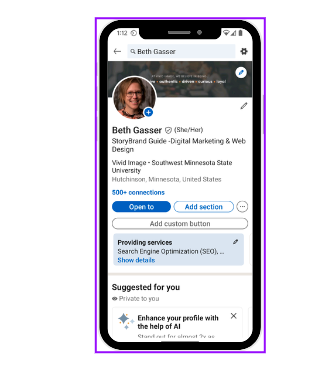
- Make your profile visible.
The first step to creating a LinkedIn profile for sales is to make sure your profile is set to “Public.” This means that anyone can see your profile, even if they’re not a LinkedIn member. If your profile is set to “Private,” only people who are already connected to you on LinkedIn will be able to see it.
Personalize the URL of your LinkedIn profile to make it easy to find and link to. By default, LinkedIn gives you a URL that includes a bunch of random numbers. - Upload a professional profile photo and background photo.
Start by adding a professional photo. Your profile photo is one of the first things people will see when they visit your profile, so make sure it’s a good one!
Use a close-up headshot and avoid using photos that are too far away or cropped oddly. And don’t use a group photo as your profile pic—people want to see YOU.
For your background photo, choose something that represents your personality or career.
Just a few examples of good background photos are:- A photo of you speaking at an event.
- A photo of you in front of your company’s logo.
- A photo of you shaking hands with a client.
- A photo of you networking at an industry event.
- Write a complete headline.
Your LinkedIn headline is one of the most important elements of your profile—it’s what shows up in search results, and it’s what people will see when they visit your profile.
Focus on making your headline more than just your job title. LinkedIn creates a default headline from your work history. Think about what makes you unique and use that to capture attention. Make sure your headline is keyword-rich so that you come up with relevant searches. - Complete your about section.
The about section is your chance to tell your story and share what makes you unique. This is where you can really sell yourself and capture the attention of potential customers and business partners. Write a summary that showcases your personality and expertise. Remember, this is your chance to really sell yourself, so don’t be afraid to brag a little bit.
When writing your About section, keep the following tips in mind:- Share your professional story — what made you decide to enter your industry, what are your career highlights, etc.
- Use keywords throughout your About section to ensure you come up with relevant searches.
- Include a call-to-action (CTA) at the end of your About section.
- Add your work experience.
In the work experience section, add your current and past positions, as well as any relevant side projects. List your experience in a way that is easy to understand and highlights your achievements. Use bullet points and include key information such as numbers and results.
When writing out this information, keep potential customers in mind instead of employers. They want to see what you’re capable of, so make sure you’re including information that will showcase your skills and expertise. - Add your skills.
The skills section of your LinkedIn profile is a great way to show off what you’re good at. Add a mix of both hard and soft skills, and be sure to include any industry-specific or technical skills. If you have any certifications, you can also add them here. To make your skills stand out, consider adding some keywords.
You can add up to 50 skills to your profile. 1st-degree connections will be able to see these and endorse them. Endorsements are a quick way for people to vouch for your skills without having to write a recommendation. - Solicit recommendations.
Recommendations are one of the most important elements of your LinkedIn profile. They act as a third-party endorsement of your skills and experience, and can really help you stand out from the competition.
When asking for recommendations, make sure you’re reaching out to people who can speak to your work ethic, skills, and experience. If you have any mutual connections, be sure to mention them.
Here are a few tips for asking for recommendations:- Personalize your request — tell the person why you’re reaching out and what you hope they’ll say.
- Be specific about what kind of endorsement you’re looking for.
- Make it easy for the person to write the recommendation by providing them with some talking points.
- Say thank you once you receive the recommendation.
- Add work examples to the featured section.
The featured section is a great way to showcase your work and give potential customers an idea of what you’re capable of. You can add projects, presentations, articles, videos, or any other kind of content that you think will help sell yourself.
When adding content to your featured section, make sure it’s high-quality and relevant.
By following these simple tips, you can create a LinkedIn profile that will help you generate more sales leads. So what are you waiting for? Get started today!
