ABOUT | BLOG | PODCASTS | EVENTS | SUPPORT

  • Skip to main content
  • Skip to footer

Vivid Image

  • Strategy
  • Web Design
    • Subscription Websites
    • WordPress Websites
    • Hosting
    • Portfolio
  • Digital Marketing
    • Online Listings
    • Reviews & Reputation
    • Google PPC
    • Local SEO
    • Social Media Ads
    • Social Media Management
    • Search Engine Optimization
    • Branding & Graphic Design
    • Content & StoryBranding
  • Marketing Department
  • Search
  • Talk with Our Team

How can we help?

Popular Searches

Website Design

Print Design

Contact Us

Search Ranking

Google Ads

Storybrand

Content Writing

Events

Training

Logo Design

Hiring

Our Team

Our Culture

The Power of Whitespace

Blog News The Power of Whitespace

August 9, 2024 by Vivid Image

What is Whitespace?

Whitespace, also known as negative space, is a design term that describes an empty area without design elements. This would include things like pictures, text, icons, etc. Despite the name being commonly referred to as white space, this empty area can actually be any color! Whitespace can be found in many forms of design, including websites, social media posts, print pieces, and more.

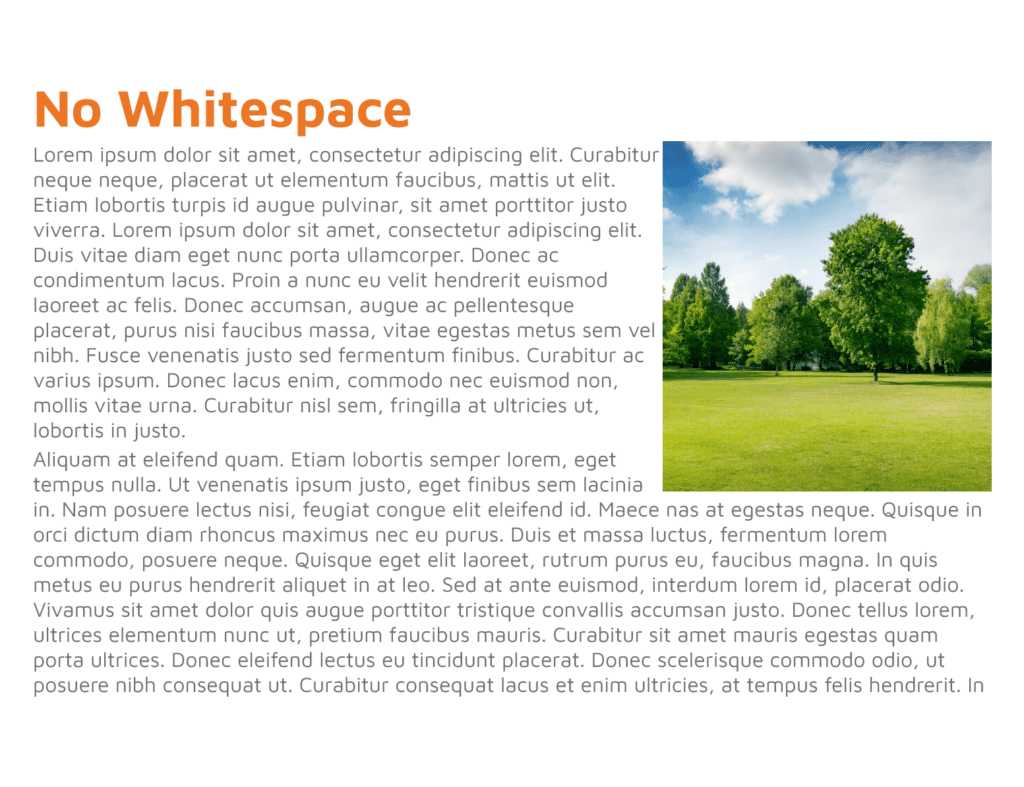
Below are two examples of sections with text and an image. One utilizes white space, and the other does not. With just a quick glance, you can probably tell that one looks better and is easier to digest, while the other is crowded. Adding just a little bit of spacing between elements can completely elevate our design.
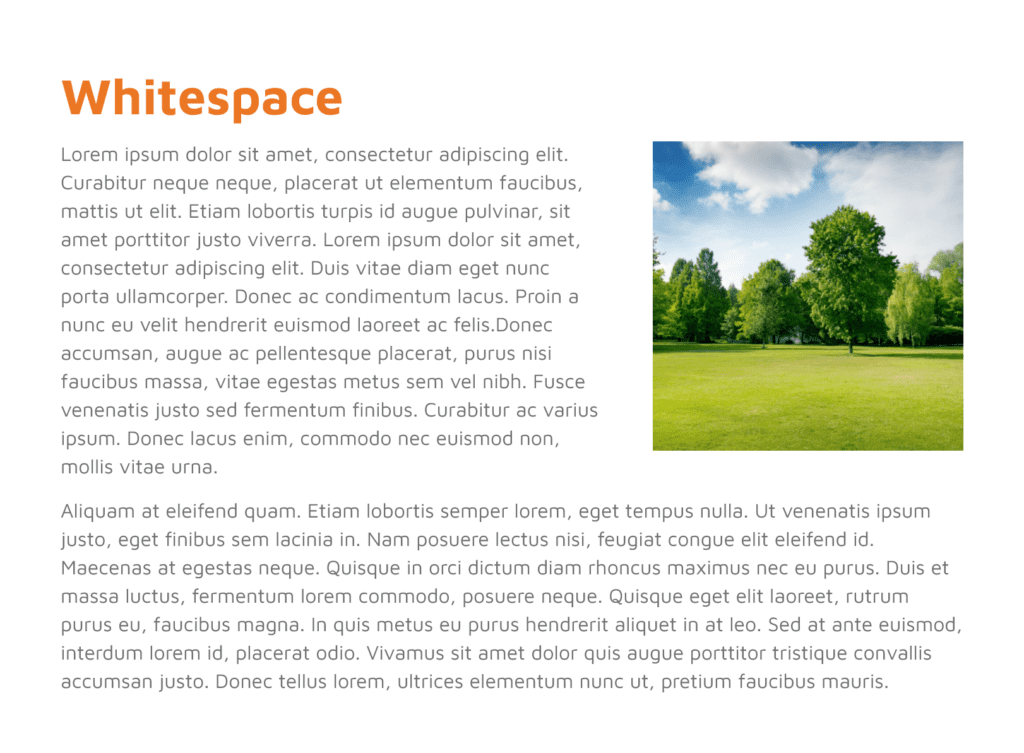
An article titled Whitespace with placeholder text sits beside a landscape photo, showcasing the beauty of whitespace in a green, open field bordered by trees under a sunny blue sky.
A section of text with the heading No Whitespace is on the left, while on the right, a photo of a green grassy field under a blue sky with scattered clouds contrasts against the white background, highlighting effective use of whitespace.

Benefits of Whitespace

Whitespace can make our designs look better, but it has more benefits than just being aesthetically pleasing. It can organize your content, ultimately making it easier to comprehend and follow up.

1. Organize content in an easy-to-understand format

The first benefit of whitespace is that it can separate elements into groups and allow the users (people viewing your design) to gather information more easily. When the design is split into different groups, the content is easier to digest since it is divided into smaller sections.

2. Make it easier to read

When we add spacing between elements like text, it’s easier to read. With enough spacing between text and other elements, it becomes much easier to read the text. When people can read the text easily, they can also comprehend it much faster.

3. Highlight important elements

Another benefit is that we can make it easier to call out elements, like your call-to-action. This is the action that you want a user to take after reading through your content. We want CTAs to be super easy to find, and using whitespace to set this apart is a great way to make sure the users see them!

Filed Under: Design, News

Footer

Vivid Image Logo

(320) 587-8974
[email protected]
897 MN-15
Hutchinson, MN 55350

  • Facebook
  • Instagram
  • LinkedIn
  • YouTube
Web Design

Subscription Websites
WordPress Websites

Hosting

Portfolio

Digital Marketing

Online Listings

Reviews & Reputation

Google PPC

Local SEO

Social Media Ads

Social Media Management

Search Engine Optimization

Branding & Graphic Design

Content & StoryBranding

Strategy

Book a Playbook

Marketing Department
Guides

Content Guide

Lead Generation Guide

Local Marketing Guide

Reviews & Reputation Guide

Safety & Security Guide

Social Media Guide

Web Design Guide

About

Our Team

Reviews

Charitable Giving

Careers

RADiCL

Resources

Events

Blog

Podcasts

Support

Training

Talk with Our Team

Copyright © 2026 Vivid Image, All Rights Reserved. Cookie Policy Terms of Service Disclaimer Site Map Accessibility Privacy Policy

This field is for validation purposes and should be left unchanged.
Name(Required)
Email(Required)