Updated 8/22/25 – So you took our advice and started posting videos on social media. Great! But now you are realizing that your videos aren’t getting the engagement you’d hoped for! This could have to do with the aspect ratio or sizing you are using to record your videos!
Over 83% of people are using social media on a mobile device instead of a desktop. So we will focus on aspect ratios for mobile use.
Why Do Aspect Ratios Matter?
“But my video is still showing up on social media, so why does it matter what size it is?” The answer is simple: user experience. Because a large majority of social media content is now video, users want it to “go with the scroll” just like any other static content would. Users aren’t interested in rotating their device to see the video full screen or view your video much smaller and squint to read the text on the screen. The video will still show with pillarboxing (usually a colored gradient bar on the top and bottom of the video), but it is not an ideal experience.
As users scroll, they wait for a video to pop up that catches their attention. They can mute or unmute easily, view (and hopefully engage with), or keep scrolling. Your improperly sized videos might be a victim to the scroll and are getting little engagement because of it.
Recording in Different Aspect Ratios
The most common aspect ratio, 9:16, and that is what you record vertically with a smartphone. If you are recording with iMovie on an iPad, you can go into settings and make changes to your aspect ratio. It gets tricky if you are recording with a digital camera. Some cameras will allow you to change the recording aspect ratio in the settings. However, if you are unable to change those settings you may have to physically orient the camera to a vertical placement. There are some tripods that have a rotating head that you mount the camera to. Here are some more options for tripod mounting your camera vertically.
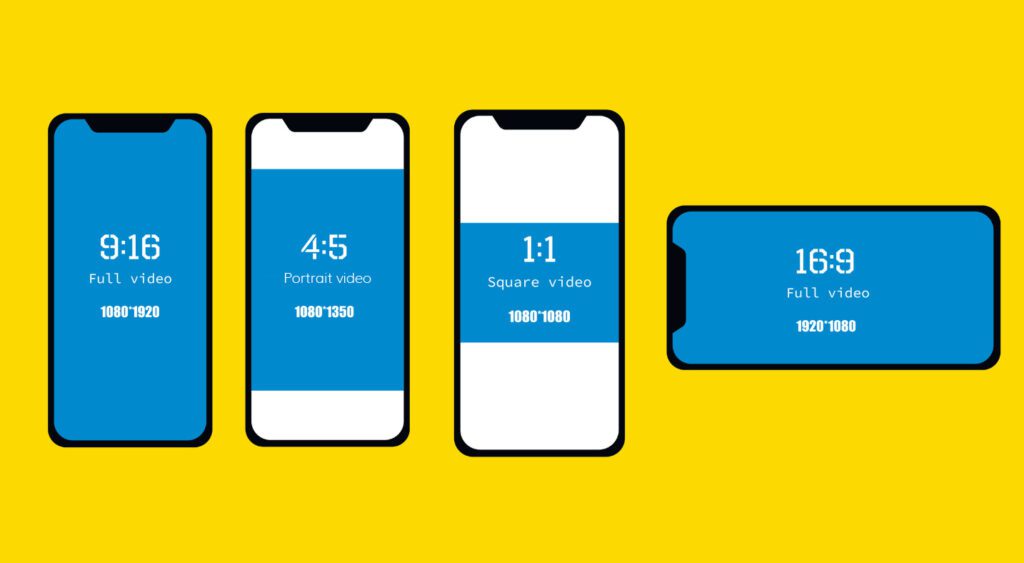
Different Aspect Ratios for Different Platforms
As great as it would be to upload one video for all platforms and all purposes and receive excellent engagement, it just doesn’t work that way. The exception is cross posting Instagram Reels to Facebook. Check out the list below for a quick overview of the main video uses for social media and their recommended aspect ratios.
- Facebook Feed – You have options for both landscape 16:9 and portrait 9:16 videos, and really anything in between: 1:1, 4:5, or 2:3.
- Instagram Feed – Supports 1:1, 16:9, and 4:5, BUT all videos on Instagram are considered Reels and can perform better in the Reels feed in 9:16.
- Facebook and Instagram Stories – supports any ratio up to 9:16, which is recommended to play full screen
- Reels on Facebook and Instagram – 9:16 vertical aspect
- Carousel Ads (Facebook and Instagram) – A 1:1 or square ratio
- Twitter – recommended 1:1 ratio to be viewed the best across many devices
- YouTube – A 16:9 ratio will avoid pillarboxing (YouTube shorts are an exception with a 9:16 aspect ratio)
- TikTok – 9:16 fills a mobile device screen (just like Reels)
And just to throw a wrench into things, TikTok is encouraging landscape videos for some cases! What?! Yes, social media moves fast, so rely on Vivid Image as your online marketing partner and let us keep you informed of changes.
Hot Tips
- If you are planning to post to multiple platforms, it may be helpful to shoot your video twice – once with your digital camera and once with your phone.
- If possible, consider setting both cameras up at once while shooting to record in multiple aspect ratios.
- Looking for more tips on creating video for social media? Check out the blog posts below or contact us today!
